
You’ve probably wondered which label maker can keep up with your projects.
Whether you’re organizing a home office or outfitting a warehouse, there are options for you.
In 2026, the market features everything from the pocket-sized Brother PTD210 with its endless font choices to the heavy-duty DYMO RhinoPRO 5200 that can handle industrial use.
Some models sync with your phone, while others have rechargeable inkless technology.
The right choice depends on how much power, portability, and tape variety you need.
Let’s see which ones stand out.
Brother PTD210 Label Maker Bundle (4 Tapes, White)

If you’re looking for a lightweight and portable label maker to help you organize everything from office supplies to closet items, the Brother PTD210 bundle is a great choice. It’s easy to use, making it perfect for anyone wanting to keep their home or workspace tidy.
Product Highlights:
- Lightweight design with a clear display for easy text preview
- Compatible with various tape widths: 12 mm, 9 mm, 6 mm, and 3.5 mm; includes durable, water-resistant TZe tape
- Offers plenty of customization with 10 styles, 14 fonts, 98 frames, and over 600 symbols
Brother P-Touch Easy Portable Label Maker Bundle (4 Tapes)

The Brother P-Touch Easy Portable Label Maker Bundle is great for anyone needing quick and professional labels on the go. Whether you’re a hobbyist, a small-business owner, or a home organizer, this label maker offers speed and durability you can count on.
Product Highlights:
- QWERTY keyboard with preview screen for fast and accurate label making
- Laminated water-resistant TZe tapes that resist fading and peeling indoors and outdoors
- Built-in memory stores up to 15 labels for quick reprints
DYMO Rhino 4200 Industrial Label Maker

The DYMO Rhino 4200 is perfect for industrial pros and on-site technicians who need fast and sturdy labeling for cables and equipment. Its full-size QWERTY keyboard makes it easy to type labels quickly, just like sending a text message.
Product Highlights:
- Full-size QWERTY keyboard lets you type labels fast
- Hot-key shortcuts and a “Favorites” button make creating common labels quicker
- Tough design with rubber bumpers and works with materials like nylon, polyester, vinyl, and heat-shrink
DYMO RhinoPRO 5200 Industrial Label Maker with Case

Heavy-duty technicians and field professionals need a label maker that keeps up with their fast-paced work. The DYMO RhinoPRO 5200 is built for speed and efficiency, making labeling on job sites a breeze.
Product Highlights:
- One-touch “Hot Keys” for quick sizing, spacing, and formatting
- Prints Code 39 and Code 128 barcodes on 19 mm wide vinyl to meet ANSI and TIA/EIA-606-A standards
- Comes with a sturdy case and two rolls of black-on-white vinyl (3/4 in and 3/8 in)
Brother Genuine P-touch PTH111 P-Touch Pro Label Maker

If you love DIY projects or work in a small shop, the Brother Genuine P-touch PTH111 is here to help you label cables and organize your garage in no time. It’s great for anyone who needs quick and easy labeling for various tasks.
Product Highlights:
- One-touch keys for Cable Wrap, Cable Flag, Faceplate, and Serialize make labeling faster.
- Three fonts and over 300 symbols let you create clear and customized labels.
- Lightweight and durable design with a detachable wrist strap for easy carrying.
Brother PT-N10 Handheld Label Maker with 12mm Color Tape

The Brother PT-N10 handheld label maker is a great choice for students and travelers looking for a quick and colorful way to keep their gear organized. Its portable design and easy-to-use keyboard make it perfect for on-the-go labeling.
Product Highlights:
- Full QWERTY keyboard and 12-character display make typing quick and easy
- Supports 17 vibrant 12 mm tapes with frames symbols and style options for creative labeling
- Built-in cutter and split-peel backing ensure clean edges and easy removal
DYMO Handheld Label Maker with 3 Tapes

Looking for a label maker that’s perfect for quick jobs around your home or office? The DYMO Handheld Label Maker with 3 Tapes is compact and easy to use, making it ideal for DIY enthusiasts, home organizers, and small office workers.
Product Highlights:
- Compact and lightweight design for easy use anywhere
- Multiple font sizes, print styles, and box styles for customizing labels
- Comes with three different LT tapes (paper and plastic) to meet most labeling needs
DYMO LabelManager 160 Portable Label Maker Bundle

Busy professionals and organized hobbyists will appreciate the DYMO LabelManager 160 for its fast and portable labeling. This handy device makes it easy to stay organized at home or in the office.
Product Highlights:
- QWERTY keyboard and smart keys allow for quick label creation
- Large screen and 300 dpi resolution provide clear, high-quality prints
- Compact and lightweight design with long battery life and 64 MB memory
SUPVAN E11 Bluetooth Label Maker with 30+ Fonts, 660+ Icons, Rechargeable Inkless
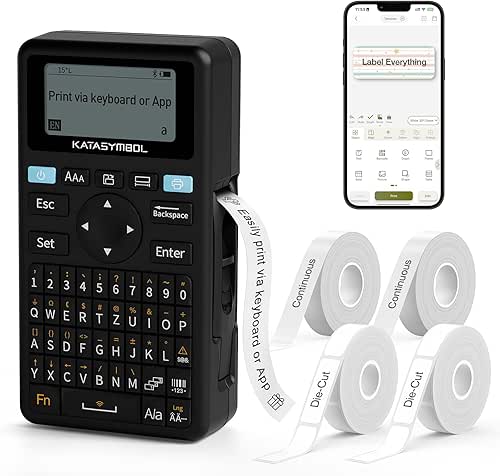
If you need quick and easy labeling, the SUPVAN E11 Bluetooth Label Maker is perfect for you. It’s great for home, office, or workshop use, letting you create labels on the go.
Product Highlights:
- Print labels instantly with the keyboard for fast results
- Use the Bluetooth app for over 30 fonts, 660 icons, and 50 frames to customize your designs
- Enjoy a long-lasting 1200 mAh rechargeable battery that can last up to a month
Nelko Bluetooth Label Maker with Tape, Wireless Mini Printer

The Nelko Bluetooth Label Maker is perfect for students, busy parents, and freelancers who need a portable and easy-to-use labeling solution. Its compact design makes it easy to take anywhere, whether you’re organizing your pantry or setting up your home office.
Product Highlights:
- Ultra-light half-size design for true portability
- BPA-free direct-thermal printing at 203 DPI with no ink or toner
- Free iOS/Android app with 90 fonts, QR codes, barcodes, and image support
Factors to Consider When Choosing Label Makers
When you pick a label maker, start by checking its print compatibility and durability so the tags survive your toughest jobs. Look for flexible print options, symbols, and enough memory to store your designs, plus a power source that fits your workflow—whether that’s batteries, USB‑C, or a built‑in rechargeable. Finally, consider smart connectivity like Bluetooth or Wi‑Fi so you can print straight from your phone or computer without hassle.
Print Compatibility and Durability
Choosing the right label maker involves considering its tape-width compatibility and durability to meet a variety of labeling needs. Here’s what to keep in mind:
- Ensure it supports multiple tape widths: 3.5 mm, 6 mm, 9 mm, and 12 mm for diverse labeling tasks.
- Prioritize laminated tapes for resistance to water, fading, and peeling, ensuring longevity in various environments.
- Opt for a higher DPI (300 dpi or more) for sharp barcodes and intricate graphics.
- Look for customization options for fonts, frames, and symbols to personalize your labels.
- Choose a model that balances speed and reliability, so you can efficiently complete your labeling projects.
ControlPrint Options and Symbols
A good label maker enhances your labeling experience with features that ensure precision and ease of use. Here are key factors to consider:
- Look for a full QWERTY keyboard for a familiar typing experience.
- Choose a model with multiple font styles and sizes for versatility in labeling.
- Check for a wide selection of symbols and icons—over 600 options can add personality to your labels.
- Ensure it has built-in templates for quick access to professional layouts and check print resolution for sharpness.
Memory and Storage Capacity
- Opt for models with at least 1 GB of memory to store multiple labels, symbols, and fonts.
- Seek built-in memory that saves custom templates to reduce setup time.
- Look for additional slots for extra symbol packs or design files to enhance creative flexibility.
- Choose a capacity that aligns with your label volume and design complexity for optimal efficiency.
Power Source Flexibility
Power source flexibility is crucial when choosing a label maker that can adapt to various environments, from a tight workshop to a busy retail setting. Here’s what to keep in mind:
- Opt for models with dual power options, allowing you to use both an AC adapter and batteries.
- Consider battery-operated units that accept common AAA or AA cells for convenience.
- Be aware that some models may require a proprietary battery pack, which can be an additional cost.
- Assess your labeling frequency; heavy use may necessitate frequent battery replacements.
- For extended labeling sessions, having an adapter handy ensures you won’t run out of power.
Smart Connectivity Features
- Ensure it has Bluetooth or Wi-Fi capabilities for easy label printing directly from your smartphone or tablet via an app.
- Look for an app that supports multiple languages and allows for template customization to maintain consistent branding.
- Choose options that offer minimal-margin printing and smart design tools to reduce waste and lower costs.
- Opt for an app that enables editing, previewing, and saving favorite labels for quick access, simplifying repetitive tasks.
Tape Width and Material Support
Choosing the right tape width and material is crucial for maximizing the effectiveness of your label maker. Here’s what to consider:
- Select tape widths ranging from 3.5 mm for tight spaces to 12 mm for bold, readable tags.
- Opt for laminated tape for everyday office use and vinyl or flexible nylon for harsh environments.
- Choose water- and fade-resistant options to ensure labels remain legible in rain or sunlight.
- For specific applications, like clothing, consider iron-on tape, and for wiring, heat-shrink tubing for added protection.
Portability and Ergonomics
A lightweight, compact label maker is a game-changer for those on the go, allowing you to effortlessly label everything from classroom supplies to field equipment. Here’s what to consider:
- Choose a model that weighs under a pound for easy portability.
- Look for a QWERTY keyboard for comfortable typing and an easy-to-read display for quick visibility.
- Opt for battery-powered units to ensure functionality when outlets are not available.
- Consider ergonomic designs that reduce hand fatigue and promote precise handling.